
CSS - Absolute, Relative and their relationship
How absolute and Relative interact together

👋 Hey, it’s Orel here! Welcome to my weekly newsletter where I share my journey and lessons as an entrepreneur who quit his job to chase his dreams.
I am a software developer, and so far I have x3 failed projects, and x2 ongoing.
I am also publishing along with Anton Zaidestech book summaries
In today’s article, I am going to discuss CSS positioning.
Specifically Relative, Absolute and how they interact.
As a FullStack developer, I found this concept one of the hardest to grasp, so I decided to make it easier for fellas who still struggle with it.
Relative, Absolute and how they interact
Relative
Relative positioning lets you move an element a bit from where it would usually sit on the page. But unlike some magic tricks in CSS, it doesn’t make the element disappear from its normal place. It’s still there, taking up space, but you can move it up, down, left, or right.
Think of it as a layer that defines the relation between its children to the layer.
Every child within the layer is bound to its size and z-index.
We’ll see the relationship more in-depth in a few moments.
Absolute
Absolute positioning is like being given a magic wand in the world of CSS. It allows you to place an element exactly where you want it, regardless of where other components are placed in the layer.
This comes with some caveats:
Layout Disruptions: Absolute positioned elements are removed from the normal HTML elements stack. therefore, they no longer take up space among their sibling elements.
That means that if your layout changes in the future, you might need to address each absolute element separately.Responsiveness Challenges: When an element is Absolute positioned, it might not adjust as expected when the screen size changes.
Dynamic Content Risks: In web apps where content size can change dynamically (think a list that you can add items to), using absolute positioning without careful consideration can lead to elements overlapping in ways that break your design.
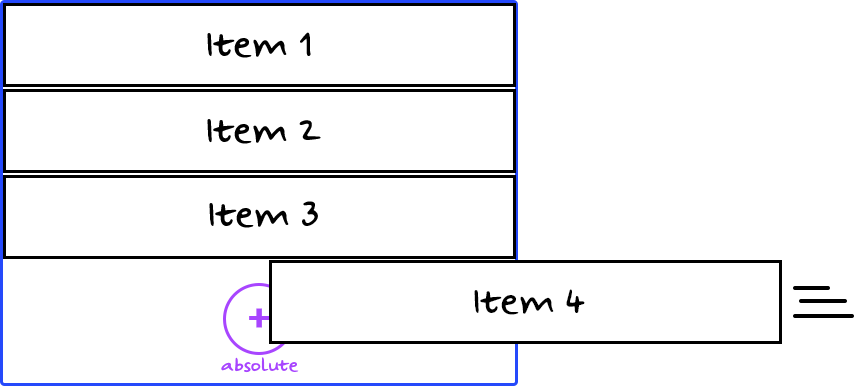
Relative and Absolute interaction
A Defined Size
Each element can have a defined size, specified by setting its width and height properties.
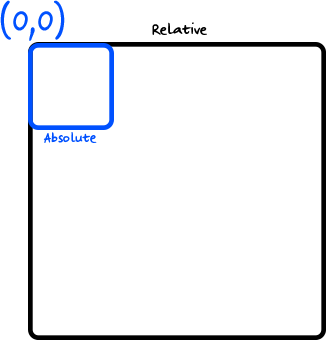
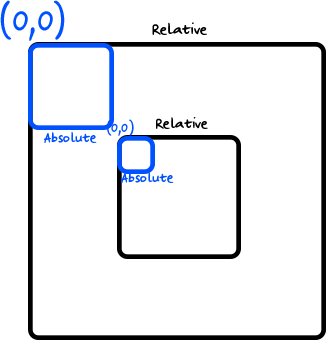
When you create a relative element with size, all it’s children will be bound to its size.
Therefore, if you place an absolute element within that relative parent, the 0,0 coordinates are the left corner of the wrapping relative parent.
Let’s see an example:
A Different Set of Z-indexes
The z-index property controls the stacking order of elements that overlap.
It can only be applied to elements with a position ≠ static (the default).
This is where the concept of layers comes into play. By assigning different z-index values, you can control which layers appear on top of others. Here's how the z-index works:
Without a z-index, elements stack in the order they appear in the HTML.
With z-index, a higher value means the element will be closer to the top of the stacking order.
Elements with the same z-index value will stack in their source order (the order they appear in the HTML).
Now here’s the tricky part:
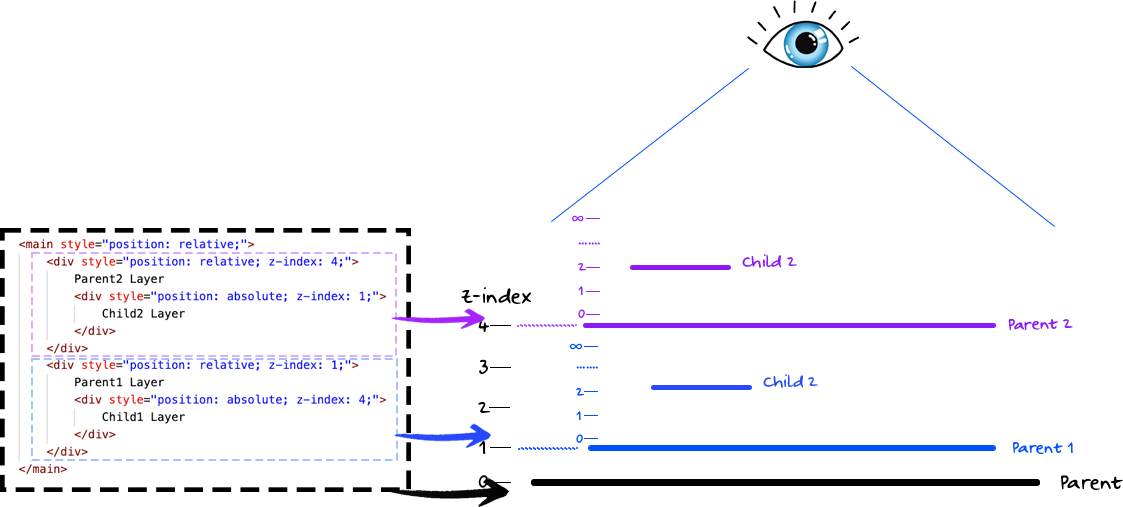
Each relative element with a specified z-index value creates a new stacking context for its child elements. This means that the z-index values of children are calculated relative to the parent, and not to the document as a whole.
Essentially, the stacking context isolates a part of the webpage's elements.
Those element’s z-index work within that specific context, rather than interacting with the entire page's elements.
Let’s see an example:
📣 Shout-outs of the week
What we learned about hiring from our first five employees by Andy Vandervell - PostHog started with 5 people. These 5 people stayed with them 4 years and 39 employees later.
As a user of PostHog, I am not surprised.
10 Must-Reads for Engineering Leaders by Anton Zaides - Anton recently became a Director of Engineering and decided to share his top 10 books for engineering leaders.
Circle of Competence - Mental Model by Michał Poczwardowski - Michal talks about the concept of the Circle of Competence and the importance of looking outside of it for growth.
“Be aware of what you are good at and where you lack expertise. Ensure you minimize the gap between what you think you know and what you actually know. Remember, the best solution to a problem may lie outside your Circle of Competence. So, ask and explore.”
How I Upgraded My Conflict Resolution Skills (Part 2) by Akash Mukherjee - With great illustrations, Akash shares part 2 of his conflict resolution skills. A great read for people who lead or want to lead.
“…It is okay to feel uncomfortable providing feedback. I still feel the same. What is not okay is hiding areas of improvement to protect our feelings.”
🎉 Welcome to new subscribers!
Christian Kuntz SalamehSeeking InsightsRaksha KannusamiSavasSchlubbiBogdan VeliscuKedson QueirozDuy Nghia DevKoushlendra KumarMahesh ShastryLaurence CharlesYassine A.Pranav RajRajan SharmaGabriel DamalisAysen BenliJay
Sorry for those of you I missed, SubStack’s search is awful.
This was a great Read, Orel. For a FE noob like me, lot of these actually made sense. Thanks for creating this in such clear language.
Also, thank you for the shout out and sharing Leadership Letters.
Thank you for quoting the Circle of Competence, Orel. I'm glad that you appreciated it.
Your article will definitely help people understand the concepts of Relative and Absolute positioning better, especially those who only think they know it.